Relay & forwarding
The Telemetry Relay taps the live telemetry already flowing into Kite, re-encodes it into another wire protocol, and pushes it out a second link. That turns Kite into a telemetry transcoder — feed an antenna tracker, a phone app, a second ground station, or convert one protocol into another — all from the data your aircraft is already sending.
It works with any input: whether your aircraft is connected over MSP (INAV), MAVLink (ArduPilot / PX4) or the passive Telemetry mode, the relay sees the same decoded telemetry and can output it in any of the supported protocols.
What the relay is — and isn't
- Live only — it forwards the active connection's telemetry; it does not forward log replay.
- One-way — it only pushes telemetry out. It never sends commands back to the aircraft.
- A transcoder, not a pass-through — everything is decoded to Kite's internal model and re-encoded, so it can convert between protocols. Fields Kite doesn't model are dropped.
Opening the panel
Click ⇅ Relay at the right of the connection bar (always visible). A panel drops down with:
- LINK — diagnostics for your primary connection: the active protocol and the live RX / TX byte rate (and messages/s), so you can confirm data is coming in.
- Relays — your configured relays, each one row. Add one with + Relay; remove it with the ✕.
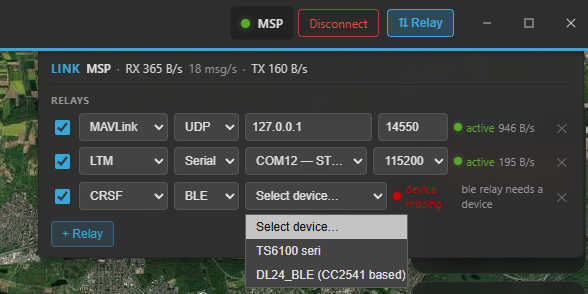
The Relay panel under the connection bar: the LINK diagnostics on top and a configured relay row below (protocol, output, status).
A relay row
Each relay is configured like a mini connection bar:
- Enable (the checkbox) — keep the config but pause it when off.
- Protocol — what to encode the telemetry as: LTM, MAVLink, CRSF or SmartPort.
- Output — where to send it:
- Serial — a second COM port + baud (also covers Bluetooth-SPP adapters like an HC-05).
- BLE — a Bluetooth Low Energy device Kite writes to.
- TCP — Kite acts as a server: it opens a listen port and the consumer (app / GCS) connects to Kite's IP.
- UDP — Kite sends to a host / IP + port you enter (can be a broadcast address).
- Status dot — idle (not connected), active (green, with the output byte rate), waiting (amber — e.g. a TCP relay with no client connected yet), device missing (the output port/device isn't available), or error.
The output must be a separate link
A relay has to use a different device than your primary connection — you can't relay back out the same serial port the aircraft is on. Pick another COM port, a BLE device, or a network target.
You can run several relays at once (e.g. LTM to a tracker and MAVLink to a tablet). Relay configs are saved between sessions and auto-start with your primary connection whenever their output device is available — there's no separate Start button.
Usage examples
Feed an antenna tracker (LTM over serial)
An LTM antenna tracker (e.g. U360GTS) wants LTM on a serial link:
- + Relay → protocol LTM.
- Output Serial → pick the tracker's COM port (an HC-05 / Bluetooth-SPP adapter shows up as a COM port too) and its baud.
- Enable it. Once your aircraft is connected, the dot goes active and the tracker starts following.
Watch on a phone / tablet (MAVLink over UDP)
Stream to QGroundControl or Mission Planner on another device on the same network:
- + Relay → protocol MAVLink.
- Output UDP → enter the device's IP and port (the MAVLink default is 14550).
- Point the app at UDP in on that port. The aircraft now shows up there — even if your aircraft talks MSP, because the relay re-encodes it as MAVLink.
Let an app connect to Kite (over TCP)
When you'd rather have the consumer dial in:
- + Relay → your protocol → output TCP → set a listen port.
- In the app, connect to Kite's IP : that port (Kite is the server). Good for an LTM tool like mwptools or a MAVLink GCS that prefers TCP.
Convert between protocols
Because everything is decoded and re-encoded, the input and output protocols are independent. For example: an ArduPilot (MAVLink) aircraft → LTM out for an LTM-only tracker; or a passive CRSF link in → MAVLink out for a MAVLink ground station.
Good to know
- TCP: Kite is the server (consumer connects to Kite). UDP: Kite is the sender (you give it the target IP/port). Listen ports must be unique — Kite bumps a duplicate to the next free port for you.
- The relay emits a complete frame set paced to the incoming telemetry rate (typically a few Hz), so the output cadence follows your link.
- Flight-mode / vehicle-type naming in the MAVLink, CRSF and SmartPort outputs is best-effort — the position, attitude, GPS, battery and basic status are the reliable fields. LTM over serial/TCP is the most validated path.
Where to go next
- Set up the incoming link first: Connecting.
- What the telemetry contains: Telemetry & display.